runshiftrunshift
amp

more agents, less chaos.

for developers

Claude Code, Cursor, or any AI agent — in sync, not in conflict.

start with a repo scan. runshift maps your codebase, creates coordination rules for files, sessions, and risky actions, and keeps agents from stepping on each other.

scan → coordinate → decide
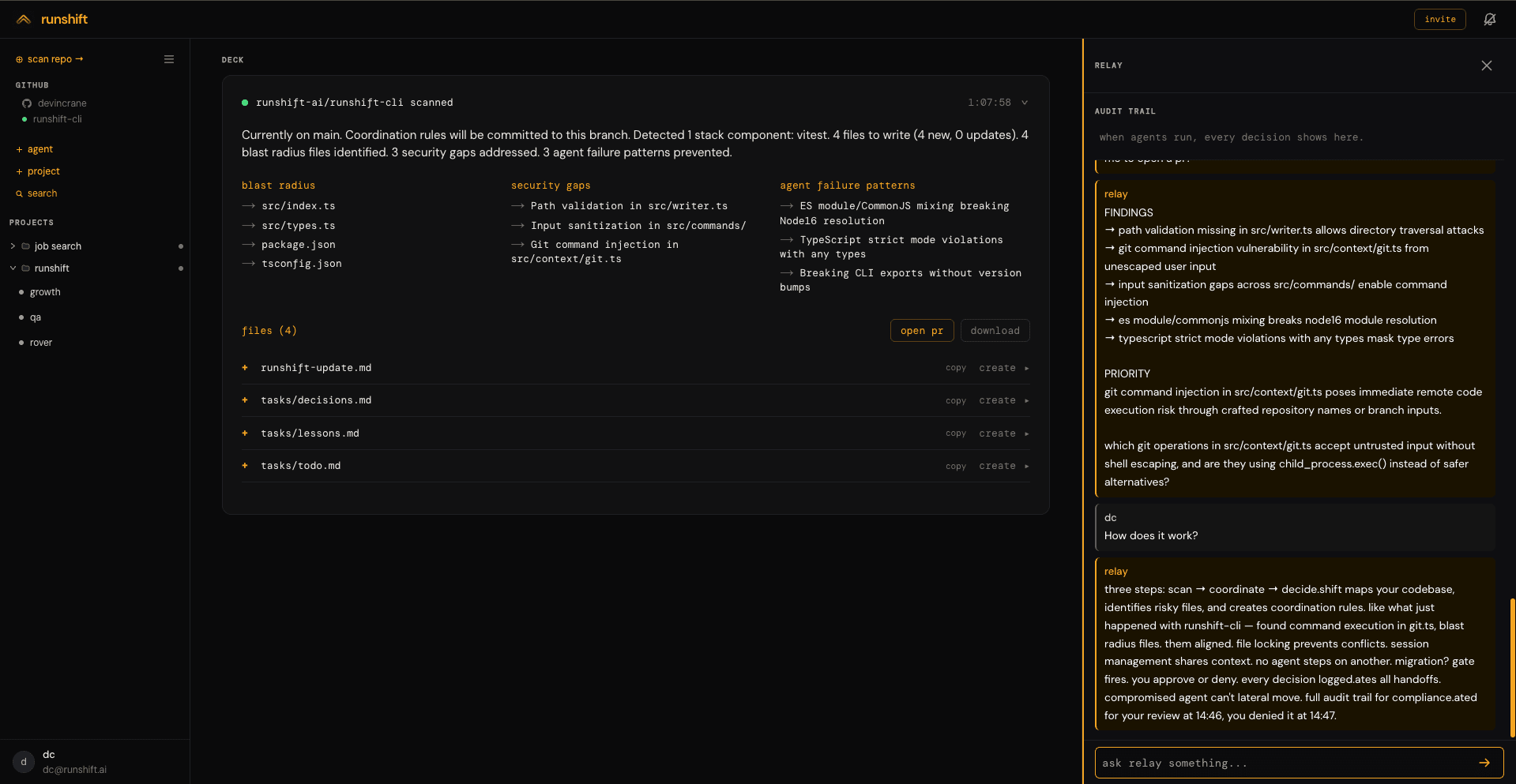
runshift dashboard
how it works
01scanscan your repo. get findings, security gaps, and recommendations in minutes.
02coordinaterunshift keeps all your agents working from the same context. fewer conflicts, less duplicate work, full visibility.
03decidetrust gates fire before consequential actions. you decide what runs.
control plane

the control plane for builders running multiple AI agents simultaneously.

scan your repo, coordinate agents working in parallel, decide what matters. Claude Code, Cursor, or any agent — all working from the same context with file locking, session management, and trust gates.

every gate fired before a consequential action is your decision. approve or deny from the dashboard or Slack. every decision is logged.

what is an agent control plane →
execution path
Agent
Claude · GPT · Gemini · custom
produces output
Model
any LLM
signals before acting
runshiftgate
operator approves
Execution
action runs · audit written
decision record
· action · context · model · cost
· approve / deny · operator · timestamp
· outcome · downstream effect
claude code integration

Connect Claude Code to your control plane

Claude Code has a hooks mechanism. Every tool call fires a signal to runshift before it executes. You see what happened. Gate it if it matters.

#!/usr/bin/env bash
# ~/.claude/runshift-hook.sh
INPUT=$(cat)
TOOL=$(echo "$INPUT" | jq -r '.tool_name // "unknown"')
OUTPUT=$(echo "$INPUT" | jq -r '.tool_output // ""' | head -c 1000)
PROJECT=$(echo "$INPUT" | jq -r '.cwd // "unknown"')

curl -s -X POST "https://www.runshift.ai/api/amp/signal" \
  -H "Authorization: Bearer ${RUNSHIFT_AMP_KEY}" \
  -H "Content-Type: application/json" \
  -d "$(jq -n \
    --arg name "${RUNSHIFT_AGENT_NAME:-claude-code}" \
    --arg task "$TOOL in $PROJECT" \
    --arg action "$TOOL: $(echo "$INPUT" | jq -c '.tool_input // {}' | head -c 500)" \
    --arg content "$OUTPUT" \
    '{agent_name:$name,status:"done",task:$task,action:$action,content:$content,reversible:true}' \
  )" > /dev/null 2>&1
Integration guide →
frequently asked questions

runshift is the control plane for builders running multiple AI agents simultaneously. start by scanning your repo — runshift maps your codebase, creates coordination rules, and keeps agents from stepping on each other. then connect Claude Code, Cursor, or any agent to the same context.

scan your repo to get findings and coordination rules. coordinate agents working in parallel around the same context, file locks, and approval gates. decide what runs — trust gates fire before consequential actions and you approve or deny from the dashboard or Slack.

A human approval interrupt that fires before a consequential agent action executes. The agent sees what it's about to do — the draft, the file change, the API call — and waits for your approval. Every decision is written to the audit trail.

Yes. Connect Claude Code via the hooks mechanism — every tool call signals runshift before it executes. Cursor and other agents connect via AMP or @runshift/connect.

Yes. Any agent connects via AMP — a single POST request before execution. No SDK required. Works with Claude, GPT, LangChain, CrewAI, or any custom agent. Read the AMP spec →

Native agents run on Claude. Any model connects via AMP. Claude Code, Cursor, and external agents all coordinate through the same control plane.

free during beta. usage-based pricing coming soon.

© 2026 runshift

terms of service·privacy policy·contact·amp·docs·blog

runshift.ai/amp